What has Changed?
You email servers have been moved. This provided higher security, better management, and more capacity. Your email storage has increased from 250MB to 5,000MB(5GB). Your capacity to send larger files has improved as well. This change does require you to log in to a new page if accessing from the web. There is a mobile app available as well and we will provide the settings for using 3rd party mail applications. More info below, and contact for support below.
Mail FAQs
How do I login?
Go to https://www.zoho.com/mail/login.html and enter your credentials.
Where is my old mail?
All your previous emails have been migrated to Zoho Mail for easy access.
What about my password?
The administrator provides a temporary password. You must create a new one on your first login.
Can I reset my password?
Yes, use the password reset option on the login page if needed.
Who do I contact?
Reach out to your administrator for any login or mail issues.
Is there a mobile app for Zoho Mail?
Yes, Zoho Mail has mobile apps available for both iOS and Android devices.
Mobile App FAQs
Where to find app?
Here are the links for app information: https://zoho.to/mailapple and https://zoho.to/mailandroid.
How to log in?
Use your username and password to access the mobile app securely.
Which devices supported?
The app supports both Android and Apple devices.
What if I forget password?
If you forget your password, use the app’s password recovery option to reset it easily or contact your administrator.
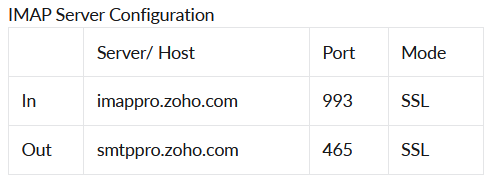
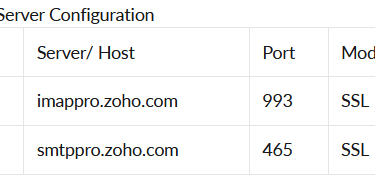
If you require server information to use third party applications like windows mail, thunderbird, or other email clients, use the information below.
Additional Mail Info
On site email setup assistance available if needed. Call or text Edward at 423-226-8026, or email at edwardj@omdtn.com.
Contact
For Emergencies, Call 911. Reach out by email anytime for questions or support.
Phone
(423) 348-7171
© 2026. All rights reserved.